
Google Cloud Next '24 recap: How to choose the right database for your use case
In this article, we’d like to share what a member of Lazuli who works as a software developer learned about databases at Google Cloud Next '24, which they attended in person in Las Vegas, and how to choose one that best suits our needs using several criteria.
Hello, my name is Tsuki. I work as a software developer at Lazuli Inc. in Tokyo. Recently, I had the opportunity to attend Google Cloud Next '24 in Las Vegas.
I would like to thank everyone at our company for giving me the opportunity to attend this wonderful event. This was my first chance to go to the United States.

Google Cloud Next is an annual event that showcases news and updates from Google Cloud. The event mainly brings together software developers from around the world who use Google Cloud in their tech stack. Through many sessions, attendees can learn more about new features and services.
Attendees could choose from more than 700 different courses, ranging from beginner-friendly introductions to advanced technical deep dives. I attended several of them, especially those focused on data storage options on Google Cloud.
At Google Cloud Next '24, the main focus was updates for GenAI, which is rapidly growing in popularity. However, since I am particularly interested in data stores, I mainly attended learning sessions that covered those topics.
In this article, I would like to share what I learned about databases at Google Cloud Next, and how to choose the right one for our needs using a few criteria.
Categories
Before diving deep into database selection, let’s first learn about the types of datastores Google Cloud offers.
There are mainly three database categories.
Relational database (RDB): A database that organizes data into tables, rows, and columns. It uses a schema to define the structure of the data. RDBs are suitable for applications that require complex transactions involving multiple operations and queries.
NoSQL database: These are schema-less databases that are ideal for handling large amounts of structured and unstructured data. They are highly scalable and offer strong performance.
Analytical database: These are designed to perform complex analytical queries on large datasets. They are optimized for read-heavy workloads and can process petabytes of data.
Details
Google Cloud provides multiple database options tailored to specific use cases.
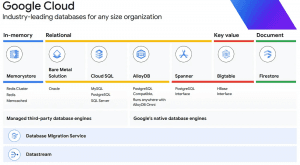
Memorystore: A fully managed in-memory datastore service for Redis and Memcached. It is a strong choice for applications that need caching to reduce latency and improve performance. It is ideal for use cases that require quick data access.
Cloud SQL: A fully managed relational database service that simplifies configuration, maintenance, management, and administration of relational MySQL, PostgreSQL, and SQL Server databases in the cloud.
AlloyDB: A fast, distributed PostgreSQL database designed for optimal performance and reliability. It provides a robust solution for applications that need efficient data processing and distributed workload management.
Cloud Spanner: A globally distributed database service best suited for large-scale, mission-critical, relational, and transactional workloads. It combines the benefits of relational database structure with non-relational horizontal scaling.
Cloud Bigtable: A low-latency, scalable NoSQL database ideal for large operational workloads. It is designed to collect and retain data from IoT, user analytics, and financial data analysis of any size.
Firestore: A NoSQL document database built for automatic scaling, high performance, and easy application development. It is an excellent choice for projects that need to store, sync, and query data at global scale.
Google Cloud also provides object storage like Cloud Storage for multimedia storage operations, and file storage like Cloud Filestore for high-performance file operations.
One of the highlights of Cloud Next was BigQuery, a serverless, highly scalable, and cost-effective multi-cloud data warehouse aimed at business agility. With the ability to analyze terabytes to petabytes of data at remarkable speed using SQL, it is considered a game changer for businesses dealing with large datasets.
At Google Cloud Next, all datastore options were presented as being of excellent quality and outperforming competitors. However, this is not always necessarily the case. Users need to evaluate their use cases based on multiple metrics.
Each of these storage options has its strengths and ideal use cases. Understanding these is important when selecting the best solution for specific needs.
💡 As GenAI applications continue to grow in popularity, Google Cloud now offers vector search support across all databases.
Metrics
Let’s set the metrics for comparing databases. While it may be difficult to create universal criteria that fit every problem and use case, there are several important points to consider:
Data type: Is the data structured?
Data size: What is the estimated amount of data?
Query complexity: What kind of query requirements do you need?
Access frequency: How often does the service access the data?
Latency: What latency is acceptable for retrieving data?
Performance: What level of performance is required?
Scalability: Will the data grow over time, and can the database handle that growth?
Cost: What are the operational costs, including data input/output, storage, and indexes?
Other possible criteria include:
Availability: Is the database available when needed? What is its uptime?
Redundancy: Does the database provide data replication and automatic failover support to ensure data availability?
Geographic distribution: Does the data need to be distributed across different regions, and does the database support that distribution?
Disaster recovery: Does the database have a strong disaster recovery plan to protect your data against potential loss or corruption?
Maintainability: How easy is it to manage and maintain the database?
Compatibility: How well does the database integrate with your existing tech stack?
Security: How sensitive is the data, and what security measures does the database provide?
Compliance: Does the database meet the regulatory and compliance requirements that apply to your business?
Features: Does the database provide the features your application needs?
Transaction support: Does your application require complex transactions, and if so, does the database support them?
Vendor lock-in: Are you comfortable with your dependence on the service provider? How easy is it to migrate data to another service if needed?
Maturity: How mature is the database technology? Is it proven, or is it still in the early stages of development?
Support: What support is available for the database? This may include community support, professional support, and documentation.
Most of these are either fully covered by Google Cloud or are not important when selecting a Google Cloud database, so I won’t cover them in this article.
Database options should also be evaluated from a cost-effectiveness perspective. Consider operational costs, including storage, data input and output, and indexes. Also think about the possibility that your data will grow over time, and whether the database can handle that growth efficiently and affordably. Remember that a database that costs more than the value it provides to your service is missing the point.
Comparison
We will compare Memorystore, Cloud SQL, AlloyDB, Cloud Spanner, Cloud Bigtable, Firestore, and BigQuery. BigQuery is closer to a data warehouse than a database, but I still wanted to include it.
<Data Type>
First, it is important to understand the type of data you are dealing with. For structured data, relational databases such as Cloud SQL and AlloyDB are a good fit. For unstructured data, NoSQL databases such as Firestore and Cloud Bigtable are more suitable. For large-scale structured data, Cloud Spanner is an excellent choice.
Database | Data Type |
Memorystore | In-memory, suitable for structured data, ideal for applications that require fast data access |
Cloud SQL | Relational, suitable for applications that require complex transactions involving multiple operations and queries |
AlloyDB | Relational, structured, ideal for applications that need efficient data processing and distributed workload management |
Cloud Spanner | Relational, structured, perfect for large-scale, mission-critical relational and transactional workloads |
Cloud Bigtable | NoSQL, suitable for both structured and unstructured data, ideal for large operational workloads |
Firestore | NoSQL, suitable for unstructured data, excellent for projects that need to store, sync, and query data at global scale |
BigQuery | Analytical, suitable for both structured and unstructured data, designed to run complex analytical queries on large datasets |
Disclaimer: These are general considerations, but the best choice may vary depending on the specific use case.
<Data Size>
Next, let’s think about data size. For small to medium datasets, Cloud SQL or Firestore may be more suitable. For larger datasets, Cloud Spanner or Cloud Bigtable may be a better fit because of their excellent scalability.
Database | Data Size |
Memorystore | Small - ideal for caching frequently accessed data |
Cloud SQL | Small to medium - suitable for applications with moderate data storage needs |
AlloyDB | Medium to large - designed for applications that require efficient data processing across distributed workloads |
Cloud Spanner | Very large - handles large-scale, mission-critical relational and transactional workloads |
Cloud Bigtable | Very large - ideal for large operational loads; collects and stores data from IoT, user analytics, and financial data analysis |
Firestore | Small to medium - ideal for applications that need frequent data storage, synchronization, and querying |
BigQuery | Very large - built for running complex analytical queries on extensive datasets |
<Query Complexity>
Next, let’s think about query complexity. If your queries are simple, Firestore or Cloud Bigtable may be sufficient. However, for complex queries involving multiple tables, subqueries, aggregation functions, or analytical functions, I recommend considering Cloud SQL or AlloyDB. If your queries are extremely complex and involve large datasets, Cloud Spanner may be the best choice.
Database | Query Complexity |
Memorystore | Suitable for simple queries |
Cloud SQL | Handles complex queries involving multiple tables, subqueries, and aggregate functions |
AlloyDB | Handles complex queries involving multiple tables, subqueries, and aggregate functions |
Cloud Spanner | Suitable for very complex queries involving large datasets |
Cloud Bigtable | Handles moderately complex queries |
Firestore | Suitable for simple queries |
BigQuery | Handles very complex analytical queries on large datasets |
<Access Frequency>
Next, we need to consider how often the data is accessed. For applications that need frequent access to data, Firestore or Cloud Bigtable may be the best choices. On the other hand, for applications where data access is relatively infrequent, Cloud SQL or BigQuery may be more suitable. In scenarios where data must be accessed extremely quickly, an in-memory solution such as Memorystore may be the most appropriate option.
Database | Access Frequency |
Memorystore | High - optimized for applications that need frequent and fast data access |
Cloud SQL | Medium - suitable for applications with moderate data access requirements |
AlloyDB | Medium - designed for applications that need regular access to data |
Cloud Spanner | High - ideal for large applications that require frequent access to data |
Cloud Bigtable | High - designed for large operational workloads that need fast data access |
Firestore | High - ideal for applications that need frequent data storage, synchronization, and querying |
BigQuery | Low - better suited for complex analytical queries on large datasets, and not ideal for frequent data access |
<Latency>
Database latency is the time it takes for a data operation to return a result. If your application requires low latency for real-time operations, Firestore, Cloud Bigtable, or Memorystore may be good choices. For applications where latency is not a critical factor, Cloud SQL, AlloyDB, or BigQuery may be more suitable.
Database | Latency |
Memorystore | Very low - due to its in-memory nature, data retrieval is almost instantaneous, making it ideal for real-time applications. |
Cloud SQL | Low - managed service with optimized infrastructure, so data access is fast for general use cases. |
AlloyDB | Low - its fast capabilities reduce data retrieval time and help support efficient data processing. |
Cloud Spanner | Low - its globally distributed architecture ensures low latency even for large, mission-critical workloads. |
Cloud Bigtable | Low - designed for fast access, it provides low latency for large operational workloads. |
Firestore | Low - automatic scaling and high-performance design ensure low latency for global-scale projects. |
BigQuery | Medium - primarily designed for complex analytical queries on large datasets, so it has slightly higher latency than the others. However, it is still efficient for its intended use cases. |
<Performance>
Performance refers to how quickly a database can execute operations. For applications that require high performance for real-time operations, Firestore, Cloud Bigtable, or Memorystore may be good choices. For applications where performance is not a critical factor, Cloud SQL, AlloyDB, or BigQuery may be more suitable.
Database | Performance |
Memorystore | High - as an in-memory datastore, it provides fast data access for real-time applications. |
Cloud SQL | Medium - optimized infrastructure provides fast data access suitable for most use cases. |
AlloyDB | High - its fast capabilities ensure rapid data processing, making it ideal for applications that need efficient data operations. |
Cloud Spanner | High - due to its globally distributed architecture, it provides fast data operations suitable for large, mission-critical workloads. |
Cloud Bigtable | High - designed for fast data operations, it is ideal for large operational workloads. |
Firestore | Medium - as a document database, it offers high performance for applications that need frequent data storage, synchronization, and querying. |
BigQuery | Medium - as a data warehouse, it is designed for running complex analytical queries on large datasets and is not suited for fast data operations. |
<Scalability>
Scalability is a database’s ability to handle increasing workloads. If you expect your data to grow over time, you should choose a database that can scale with your needs. Firestore, Cloud Bigtable, and Cloud Spanner are designed to handle large amounts of data and can scale up or down depending on your needs.
Database | Scalability |
Memorystore | Medium - it offers decent scalability, but because it is an in-memory datastore, its size is limited by the available memory. |
Cloud SQL | Medium - Cloud SQL can handle moderate workload growth and is suitable for applications with steady growth. |
AlloyDB | High - AlloyDB is designed to handle distributed workloads efficiently and is highly scalable for applications with variable or rapidly growing data needs. |
Cloud Spanner | High - thanks to its globally distributed architecture, Cloud Spanner can scale out horizontally to handle even the largest workloads, making it ideal for large-scale applications. |
Cloud Bigtable | High - Cloud Bigtable is designed to handle large workloads and can scale up or down as needed, making it suitable for large operational workloads. |
Firestore | Medium - Firestore can scale up or down with your data needs, but it is better suited for applications with moderate storage needs. |
BigQuery | High - BigQuery is designed for analyzing large datasets and is highly scalable for data analytics tasks. |
<Cost>
Database costs vary based on several factors, including the amount of data stored, the number of operations performed, and the amount of network traffic. Firestore and Cloud SQL are generally more cost-effective for smaller datasets, while Cloud Spanner and Cloud Bigtable may be more cost-effective for larger datasets.
Database | Cost |
Memorystore | High - because of its in-memory nature and fast data access, costs can rise quickly, especially for large datasets. |
Cloud SQL | Medium - as a fully managed service, pricing includes storage, operations, and network traffic. It may be cost-effective for moderate data storage needs. |
AlloyDB | High - costs can be higher because of its fast capabilities and efficient data processing, especially for large distributed workloads. |
Cloud Spanner | High - its globally distributed architecture and scalability for large workloads make it expensive, especially for large mission-critical workloads. |
Cloud Bigtable | Medium - pricing is based on storage, network traffic, and operations performed. Despite its scalability for large workloads, costs may be moderate depending on usage. |
Firestore | Medium - pricing is based on the number of reads, writes, and deletes performed and the amount of storage used. For applications with frequent data operations, costs are usually moderate. |
BigQuery | Low - as a data warehouse designed for complex analytical queries, pricing is based on the amount of data processed by those queries. This can make it more cost-effective for large datasets. |
Below is a comprehensive summary of the various criteria to consider when choosing a database. These criteria are based on the characteristics of the different database options offered by Google Cloud.
Criteria / Database | Data Type | Data Size | Query Complexity | Access Frequency | Latency | Performance | Scalability | Cost |
Memorystore | Best for structured data | Best for small data sizes | Handles simple queries | High-frequency access | Extremely low latency for instant data retrieval | Lightning-fast performance for real-time applications | Moderate scalability | High cost, especially for large datasets |
Cloud SQL | Best for structured data | Suitable for medium-sized datasets | Can handle complex queries | Medium-frequency access | Low latency for fast data access | Fast performance suitable for most use cases | Moderate scalability for applications with steady growth | Moderate cost considering storage, operations, and network traffic |
AlloyDB | Designed for structured data | Can handle large data sizes | Can handle complex queries | Medium-frequency access | Low latency thanks to fast capabilities | Lightning-fast performance for efficient data operations | High scalability for applications with variable or rapidly growing data needs | High cost, especially for large distributed workloads |
Cloud Spanner | Best for structured data | Best for extremely large data sizes | Supports complex queries | High-frequency access | Low latency even for large mission-critical workloads | Lightning-fast performance thanks to its globally distributed architecture | High scalability capable of handling even the largest workloads | High cost, especially for large mission-critical workloads |
Cloud Bigtable | Suitable for both structured and unstructured data | Best for extremely large data sizes | Handles moderately complex queries | High-frequency access | Low latency for fast data access | Lightning-fast performance for large operational workloads | High scalability that can be adjusted as needed | Moderate cost depending on usage |
Firestore | Excellent for unstructured data | Best for medium-sized datasets | Handles simple queries | High-frequency access | Low latency for global-scale projects | Fast performance for frequent data storage, synchronization, and querying | Moderate scalability, better suited for medium-sized storage needs | Moderate cost for applications with frequent data operations |
BigQuery | Suitable for both structured and unstructured data | Best for extremely large data sizes | Can handle complex queries | Low-frequency access | Moderate latency that is efficient for the intended use case | Moderate performance designed for complex analytical queries on large datasets | High scalability for data analytics tasks | Low cost, especially for large datasets |
And here is the cheat sheet for choosing a database.
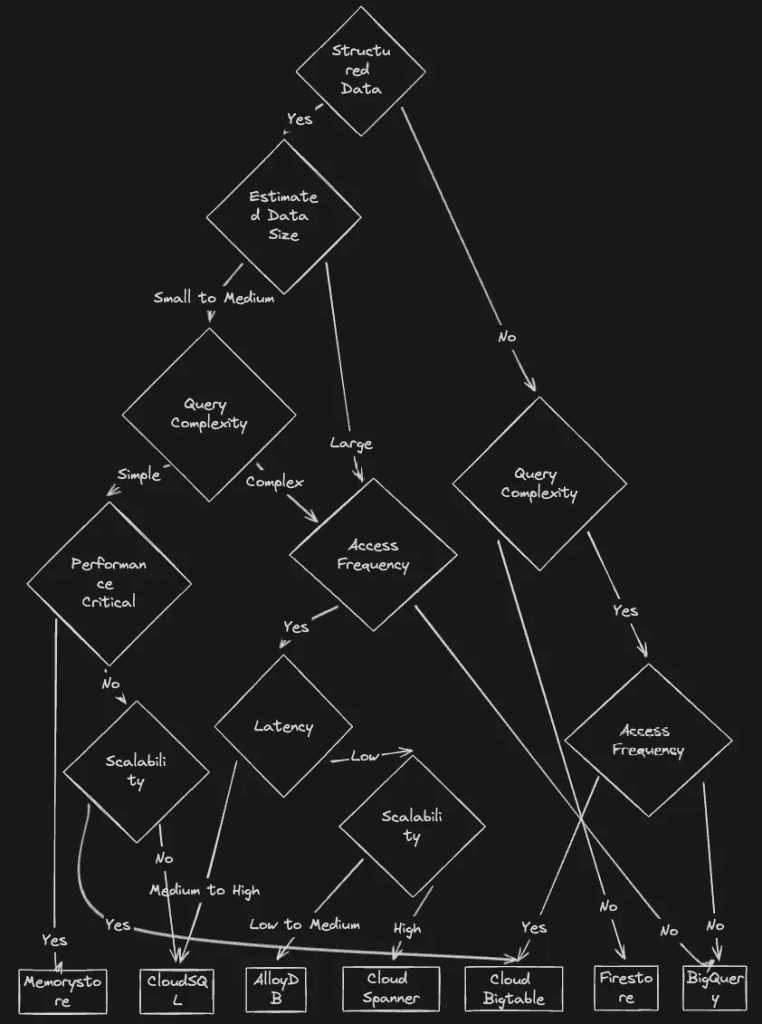
I used to believe that NoSQL was the answer to the problems of this era. But from my personal experience, over time I realized that query requirements generally become more complex.
It is difficult to predict all requirements from the beginning. So when you start choosing the right option, I recommend first considering data size, query complexity, and access frequency.
Summary
From what I learned at Google Cloud Next '24 and from my own experience, there are not many solutions that satisfy every requirement when choosing a database. It is important to consider the specific needs and requirements of your application, and also the trade-offs that come with each choice. By doing so, you can make the best informed decision. As technology continues to evolve, I am looking forward to seeing how these databases adapt and improve to better meet our needs.
And thank you very much for reading this article. I hope it helps you make a metric-based decision when choosing a database for your next project.
This article is a translation of the following article: "Google Cloud Next 24 recap: How to choose the right datastore for your use case".